

Clients usually do not need pages of raw SEO data. They need a clear explanation of performance, business impact, completed work, problems that need attention, and the actions planned for the next reporting period.
This guide explains how to make an SEO report for a client, what an SEO report should include, how to structure an SEO audit report, and how to create a reusable SEO report template for monthly reporting.
What Is an SEO Report for a Client?
An SEO report is a structured summary of a website's search-engine performance over a specific period.
Depending on the project, it can include:
Organic traffic
Search impressions
Clicks
Click-through rate
Keyword rankings
Landing-page performance
Organic conversions
Technical SEO issues
Content performance
Backlinks
Referring domains
Competitor visibility
Completed SEO tasks
SEO opportunities
Recommended next steps
The purpose isn't to overwhelm a client with metrics.
The purpose is to translate SEO data into understandable business insights.
For example:
Organic traffic increased by 24% this month, primarily because three service pages gained visibility for high-intent keywords.
This is more useful to a client than simply displaying a traffic graph.
Why Is Client SEO Reporting Important?
Consistent reporting creates transparency between an SEO professional and a client.
A strong report helps demonstrate:
Progress
The client can see how organic visibility has changed.
Business impact
Traffic and rankings can be connected to leads, sales, calls, sign-ups, or other meaningful outcomes.
SEO work completed
The client can understand what activities were performed during the reporting period.
Problems
Technical, content, indexing, ranking, or conversion problems can be documented.
Future priorities
The report can explain what the SEO team intends to work on next.
Good reporting therefore becomes part of the SEO strategy itself—not just an administrative task.
What Should an SEO Report Include?
A professional SEO report should contain enough information to explain performance without burying the client in unnecessary data.
1. Executive Summary
Start with a short summary of the most important developments.
Include:
Overall SEO performance
Major wins
Important problems
Business impact
Key work completed
Next priorities
For example:
SEO Summary
Organic clicks increased compared with the previous reporting period, while several commercial keywords improved in visibility. New service content was published, technical indexing issues were addressed, and internal linking was expanded. The next reporting period will focus on improving priority service pages and increasing qualified organic conversions.
This gives the client context before they reach the detailed metrics.
2. SEO Goals and KPIs
Your report should connect SEO activities with the client's actual goals.
Possible SEO KPIs include:
Organic sessions
Organic clicks
Search impressions
Average position
CTR
Keyword visibility
Leads
Phone calls
Form submissions
Ecommerce transactions
Revenue
Conversion rate
Indexed pages
Referring domains
Backlinks
Do not automatically report every available metric.
Choose KPIs based on the client's objectives.
3. Organic Traffic Performance
Show how organic traffic changed during the reporting period.
Useful comparisons include:
Current month vs previous month
Current month vs same month last year
Current quarter vs previous quarter
Year-to-date performance
Look beyond the percentage increase.
Ask:
Why did traffic change?
Possible explanations include:
Ranking improvements
New pages
Search-demand changes
Algorithm changes
Seasonality
Technical problems
Content updates
Competitor changes
This turns reporting from data collection into analysis.
4. Keyword Ranking Performance
A keyword ranking section can show:
Keyword | Previous Position | Current Position | Change | URL |
|---|---|---|---|---|
Primary keyword | 12 | 7 | +5 | Service page |
Secondary keyword | 18 | 11 | +7 | Blog page |
Commercial keyword | 8 | 5 | +3 | Landing page |
Don't report hundreds of keywords without context.
Focus on keywords that matter to the client's:
Products
Services
Locations
Revenue
Leads
Strategic topics
A smaller set of meaningful keywords is usually more useful than a massive ranking export.
5. Google Search Console Performance
Search Console data can help demonstrate how the site is performing in Google Search.
Useful metrics include:
Clicks
Impressions
CTR
Average position
Top queries
Top pages
You can identify opportunities such as pages receiving many impressions but relatively few clicks.
Those pages may benefit from improvements to:
Title tags
Meta descriptions
Search intent alignment
Content quality
Internal linking
SERP positioning
6. Conversions and Leads
This is one of the most important sections of a client SEO report.
Traffic is useful, but business outcomes are often more important.
Depending on the website, track:
Contact-form submissions
Phone calls
Quote requests
Purchases
Bookings
Account registrations
Downloads
Newsletter sign-ups
Where reliable attribution is available, connect organic traffic to conversions.
For example:
Organic sessions → landing pages → leads → qualified leads → sales
This provides much stronger evidence of SEO value than rankings alone.
7. Technical SEO Performance
Your SEO audit report for a client should explain important technical findings.
Possible areas include:
Indexing
Crawlability
XML sitemap
Robots.txt
Canonical URLs
Redirects
Broken links
Duplicate content
HTTPS
Mobile usability
Core Web Vitals
Structured data
Page experience
Don't simply list technical errors.
Explain their significance.
Weak reporting:
37 broken links found.
Better reporting:
37 broken internal links were identified across important pages. These can create poor user experiences and inefficient crawling. The highest-priority links should be corrected first.
The second version tells the client what the problem means and what to do about it.
8. On-Page SEO
Report meaningful on-page improvements such as:
Title optimization
Meta descriptions
H1/H2 structure
Search-intent alignment
Content expansion
Internal links
Image optimization
Entity/topic coverage
Duplicate content improvements
Again, focus on outcomes rather than task volume.
Instead of:
Optimized 20 titles.
Explain:
Updated titles on 20 priority landing pages to better match commercial search intent and improve relevance for target queries.
9. Content Performance
Your content section can include:
New content published
Existing content updated
Top-performing pages
Declining pages
Pages gaining impressions
Pages gaining clicks
Content opportunities
Content requiring consolidation
Internal-link opportunities
A useful report should explain which content is contributing to SEO growth and why.
10. Backlinks and Off-Page SEO
Depending on the project, include:
New referring domains
New backlinks
Lost backlinks
Important referring websites
Link quality
Digital PR activity
Link-building campaigns
Avoid presenting backlink quantity as the only measure of success.
A smaller number of relevant, trustworthy links can be more meaningful than a large volume of low-value links.
11. Competitor Performance
Competitor analysis can help explain ranking movements.
You can compare:
Keyword visibility
Organic traffic estimates
Content coverage
Ranking pages
Backlink profiles
New content
SERP presence
The goal isn't simply to say:
Competitor A has more backlinks.
Instead, identify actionable gaps:
Competitors consistently rank with dedicated service pages for this topic, while the client's site currently addresses the topic only within a broader page.
That insight can lead directly to an SEO action.
SEO Audit Report for Client
An SEO audit report is usually more diagnostic than a regular monthly SEO report.
A useful audit can contain:
Technical SEO
Crawlability
Indexation
Site architecture
Canonicals
Redirects
Sitemap
Robots directives
On-Page SEO
Titles
Meta descriptions
Headings
Content quality
Internal linking
Image optimization
Content
Search intent
Content gaps
Thin content
Duplicate content
Outdated content
Off-Page SEO
Backlinks
Referring domains
Authority signals
Link opportunities
Local SEO
For local businesses:
Local landing pages
NAP consistency
Local citations
Reviews
Local search visibility
Recommendations
Every significant finding should ideally have:
Issue → Impact → Recommendation → Priority
This makes the audit actionable.
How to Make an SEO Report for a Client
Now let's turn the above sections into a repeatable workflow.
Step 1: Define the Client's SEO Goals
Before collecting data, establish what success means.
For example:
Increase qualified organic leads
Improve visibility for service keywords
Increase ecommerce revenue
Grow local search traffic
Increase organic traffic
Improve rankings for strategic topics
Without defined objectives, an SEO report can become a collection of unrelated metrics.
Step 2: Choose the Reporting Period
Define the reporting window.
Common options include:
Monthly
Quarterly
Six-month
Annual
For ongoing SEO campaigns, monthly reporting is common.
Always clearly state the period being analyzed.
Step 3: Collect SEO Data
Gather data from the tools relevant to the project.
Potential sources include:
Google Search Console
Google Analytics
Rank-tracking software
SEO crawling tools
Backlink analysis tools
Google Business Profile
CRM or lead-management systems
Ecommerce analytics
Only include data that supports the client's objectives.
Step 4: Compare the Data
Raw numbers have limited meaning without comparison.
Compare:
Current period vs previous period
and, where appropriate:
Current period vs same period last year
For example:
KPI | Previous | Current | Change |
|---|---|---|---|
Organic clicks | 8,420 | 10,150 | +20.5% |
Impressions | 152K | 181K | +19.1% |
Leads | 126 | 151 | +19.8% |
The exact figures should always come from the client's verified analytics data rather than assumptions.
Step 5: Identify Wins and Problems
Separate findings into clear categories.
Wins
Ranking improvements
Traffic growth
New pages generating traffic
Increased conversions
Successful content updates
Problems
Ranking losses
Indexing issues
Technical errors
Traffic declines
Conversion problems
Lost backlinks
Opportunities
Keywords ranking on page two
High-impression/low-CTR pages
Content gaps
Internal-link opportunities
Competitor gaps
This makes the report easier to scan.
Step 6: Turn Data Into SEO Insights
This is where an SEO professional adds the most value.
Don't simply say:
Organic traffic increased 15%.
Explain:
Organic traffic increased 15%, driven primarily by improved visibility across the service category pages. The largest gains came from pages targeting commercial-intent searches.
The client should understand the reason behind the result.
Step 7: Add Actionable Recommendations
Every important problem should have a proposed action.
Finding | Impact | Recommendation | Priority |
|---|---|---|---|
Important pages have weak internal linking | Pages may receive less authority/context | Add contextual links from relevant high-authority pages | High |
Several pages have declining clicks | Reduced organic traffic opportunity | Review intent, SERP changes and content freshness | High |
Images are oversized | May affect page performance | Compress and serve appropriately sized images | Medium |
This is much more useful than an issue list.
Step 8: Create the Next-Month SEO Action Plan
End the report with a clear roadmap.
Example:
Priority 1
Optimize five high-value service pages.
Priority 2
Publish content targeting identified keyword gaps.
Priority 3
Improve internal linking between commercial pages and supporting content.
Priority 4
Resolve remaining technical SEO issues.
Priority 5
Continue monitoring rankings and organic conversions.
This answers the client's most important question:
"What are we doing next?"
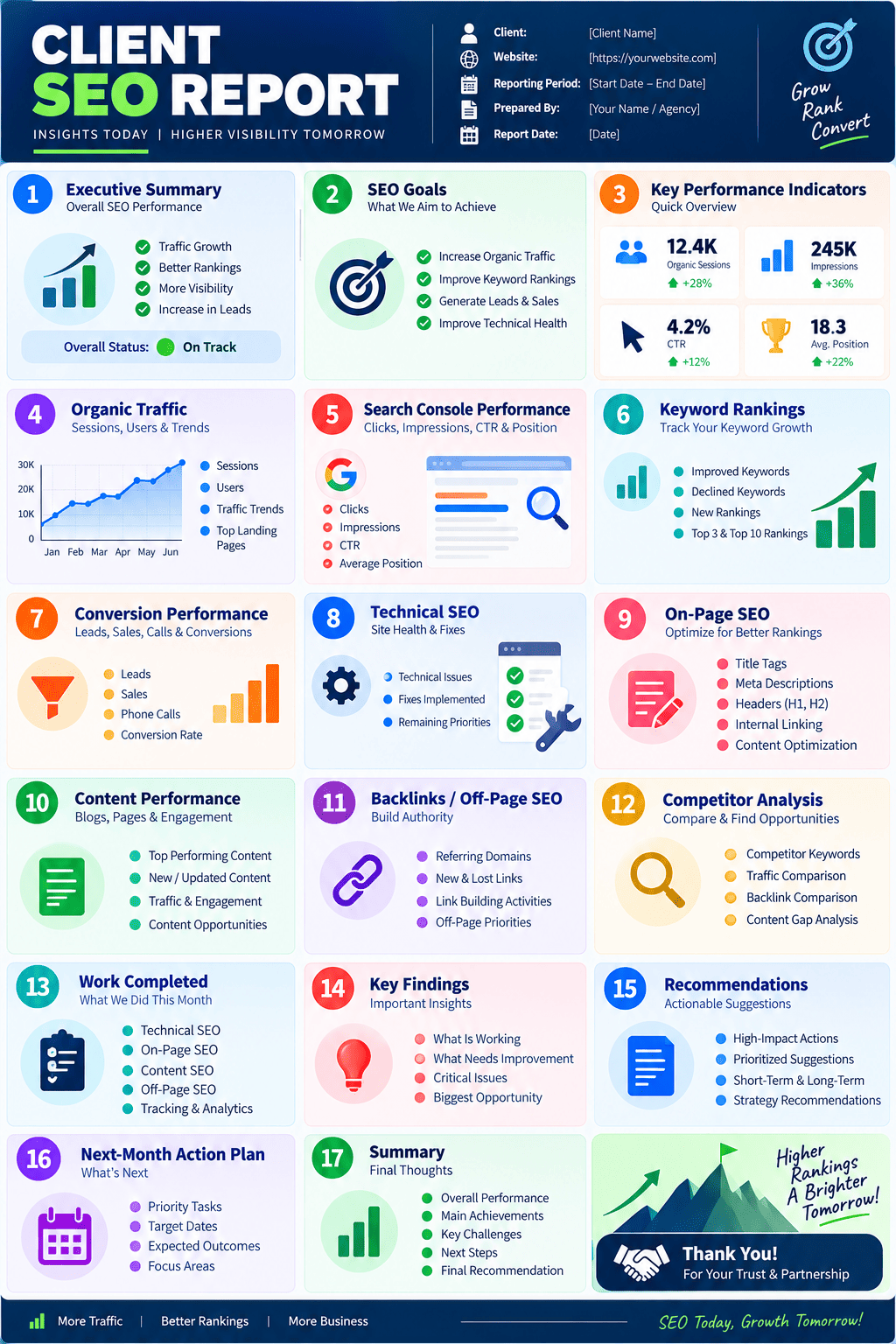
SEO Report Template for Client
A reusable SEO report for client template can follow this structure:
This structure can be adapted into a Word document, PDF, spreadsheet dashboard, or presentation, depending on how the client prefers to consume reports.
Sample SEO Report for Client
Here is a simplified example of how the finished report might communicate results:
Executive Summary
Reporting Period: August 1–31
The website experienced positive organic growth during August, with increased search visibility across priority commercial pages. Several target keywords improved in ranking, while content updates helped strengthen visibility for informational queries.
Key Results
Organic clicks: +18%
Organic impressions: +22%
Priority keywords in Top 10: +9
Organic leads: +14%
Work Completed
Optimized priority service pages
Published supporting informational content
Improved internal linking
Resolved technical indexing issues
Updated selected title tags and meta descriptions
Key Opportunity
Several commercial pages are receiving substantial impressions but comparatively low CTR. These pages should be prioritized for SERP snippet and search-intent optimization.
Next Month
Optimize high-impression pages
Expand internal linking
Publish priority content
Monitor conversion performance
Continue technical SEO improvements
This is the type of SEO report for client example that communicates strategy rather than simply dumping analytics exports.
Free SEO Report for Client: What Should It Include?
A free SEO report for client should still focus on useful information rather than trying to replicate every feature of expensive SEO platforms.
At minimum, include:
Organic performance
Search visibility
Important keyword changes
Top landing pages
Technical issues
Content updates
Conversions where available
Completed work
Recommendations
Next steps
The value of a report comes from interpretation and action, not the number of charts.
SEO Report Generator: Should You Use One?
An SEO report generator can automate repetitive reporting tasks.
Depending on the platform, automated reporting may help collect:
Rankings
Traffic
Search Console data
Backlinks
Technical metrics
KPI trends
Charts
Dashboards
Automation is useful when an agency manages multiple websites.
However, automation should not replace analysis.
A generated report may tell you:
Organic traffic decreased 12%.
An SEO professional should investigate:
Organic traffic decreased 12% because several high-value pages lost visibility after a change in search demand and competitor positioning.
The second statement is what the client actually needs.
SEO Report Generator Free vs Manual Reporting
Approach | Advantage | Limitation |
|---|---|---|
Manual report | Highly customized | Time-consuming |
Free SEO report generator | Fast and inexpensive | Often limited customization |
Paid reporting platform | Automation and dashboards | Ongoing cost |
Hybrid reporting | Automation + expert analysis | Requires a defined workflow |
For agencies, a hybrid approach is often practical: automate data collection while keeping the interpretation, recommendations, and strategy human-led.
How to Present an SEO Report to a Client
Don't start a client meeting by showing 50 metrics.
Start with:
1. What changed?
Summarize the biggest movements.
2. Why did it change?
Explain the likely causes using available evidence.
3. What did we accomplish?
Connect completed SEO work to objectives.
4. What needs attention?
Identify risks and opportunities.
5. What's next?
Present the prioritized action plan.
This makes the report easier for non-SEO stakeholders to understand.
Common SEO Reporting Mistakes
Reporting vanity metrics
Large traffic numbers don't necessarily mean business growth.
Showing rankings without context
Ranking #3 for a low-value keyword may matter less than ranking #8 for a high-converting commercial query.
Reporting tasks instead of outcomes
"Published 10 blogs" is an activity.
"Published 10 supporting articles that generated visibility for previously uncovered topics" provides context.
Using too many charts
More data doesn't automatically mean better reporting.
Hiding negative results
A trustworthy report should acknowledge declines and explain the response.
Making unsupported claims
Don't attribute every traffic increase to SEO work unless the available evidence supports the conclusion.
Ignoring conversions
SEO should ultimately connect to meaningful business outcomes where measurement allows.
No next steps
A report without recommendations is incomplete.
Client SEO Reporting Checklist
Before sending the report, check:
Reporting period is clearly stated
Client goals are included
Important KPIs are reported
Organic traffic is compared
Search Console data is reviewed
Keyword changes are explained
Conversions are included where measurable
Technical SEO issues are prioritized
Content performance is analyzed
Important backlinks are reviewed where relevant
Competitor insights are included where useful
Completed work is documented
Major wins are highlighted
Problems are acknowledged
Recommendations are actionable
Next month's priorities are defined
Data sources and reporting dates are clear
Final SEO Reporting Framework
A simple way to remember the entire process is:
GOALS - DATA - COMPARISON - INSIGHT - ACTION
Goals
What does the client want SEO to achieve?
Data
What happened during the reporting period?
Comparison
How does performance compare with the previous period or relevant benchmark?
Insight
Why did the change happen?
Action
What should the SEO team do next?
That framework produces a report that is not just a collection of SEO metrics, but a decision-making document for the client.










0 comments
Be the first to share your thoughts.
Leave a comment
Replying to — cancel